

Introduction
At the time of job search, the biggest challenge is tracking about which company you have applied to and when to follow up with the recruiter. When you have written everything in different places, then confusion can arise and opportunities can be missed. That’s why a personal job search dashboard makes your job hunting organized, focused, and stress-free.
It is a central place where you can keep records of your job applications, resume versions, follow-ups, recruiter contacts, and interviews. Through this, you get clarity on where you have reached and what will be your next step.
In simple words, by creating a dashboard, job search becomes a strategic plan through which you can apply smartly, follow up timely, and see your progress clearly.
What is a Personal Job Search Dashboard?
A personal job search dashboard is basically a central tool or workspace where you can track all the important details of your job hunting. You can record:
- For which job you have applied
- When you applied and when to follow up
- Which recruiter has contacted or replied
- Which skills you have and which to improve
- Interview schedule and feedback
The main purpose of the dashboard is to get clarity and control over your job search process. When you have an organized dashboard, then you can easily see which applications are pending, which have been shortlisted, and which interviews or offers are going to come.
Simply, it is your personal control center for your job search, which removes confusion and makes the process efficient and stress-free.
Why You Need a Job Search Dashboard?
At the time of job search, people face confusion and stress. We can easily lose track between many applications, follow-ups, interviews, and networking contacts. That’s why a personal job search dashboard becomes a life saver for you.
Benefits are:
- No more confusion
- Better follow-ups
- Professional approach
- Saves time
- Clear progress tracking
In simple words, a dashboard creates your job search organized, focused, and stress-free, through which your chances of success improve.
How to Build a Personal Job Search Dashboard?
1. Job Listings Tracker
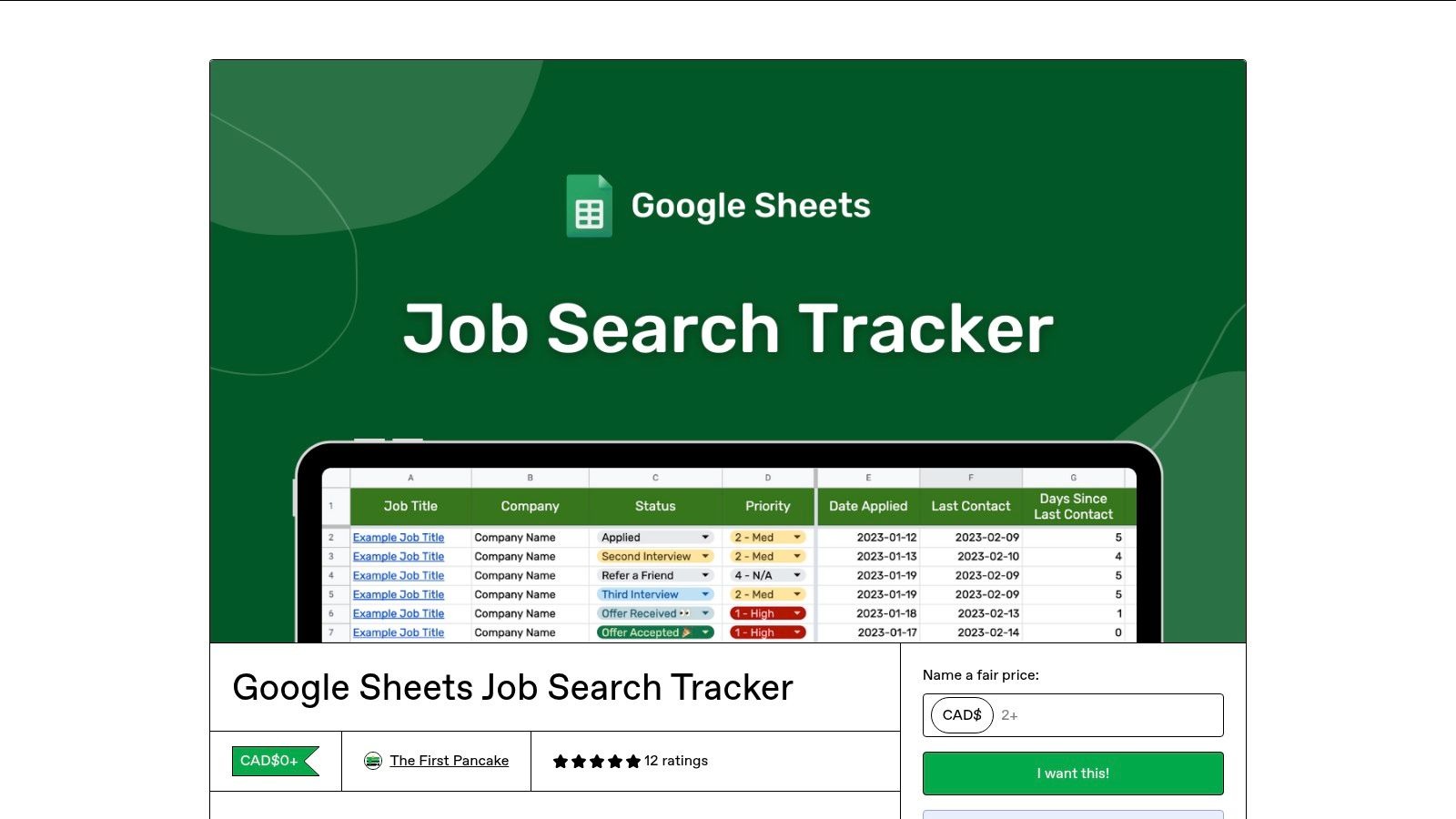
The job listing tracker is the heart of the dashboard. This section helps you to record every job opportunity in one place so that you can easily track which jobs you have applied for and which are pending. In this tracker, you can include company name, job title and link, location, and salary.
You can create the table in Google Sheets or Notion, where there should be a row for every job and all the details should be in columns. This way, you get a clear picture at just a glance.
2. Application Status
The application status section helps you to track real-time progress. When you apply for multiple jobs, it is very important to remember from which job you get responses, which are scheduled for interviews, and which ones have been rejected. You can also use common status options such as Saved, Applied, Shortlisted, Final Interview, Offer Received, and Rejected. You can use color coding or a drop-down menu in Excel or Google Sheets. Through this, you can easily understand the progress of your job search.
3. Follow-Up & Deadline Reminders
Tracking follow-ups and deadlines is a key factor for success in job search. If you haven’t followed up after an interview or application, then chances reduce. The dashboard helps you to take action timely. You can include in this section the application date, follow-up date, interview date, and expected result date. You can set conditional formatting or formula reminders in Google Sheets so you will not miss any important action.
4. Resume & Cover Letter Versions
Using the same resume and cover letter for every job search is not effective. Using tailor-made documents for every company and role gives you better results. There should be a section in your dashboard where you can track the version of your resume and cover letter. In this, you can include resume version, cover letter version, keywords highlighted for applicant tracking systems, and skills emphasized for a specific role.
When you track this, in the future you can easily see which version is working and which needs improvement. Through this, your applications look targeted and professional.
If you want tips to tailor your resume, then read our guide here.
5. Recruiter & Networking Contacts
Networking is very important in job search, but if you do not track every contact and conversation, then you can miss opportunities. A section of networking contacts in the dashboard helps you to maintain a strong professional network. In this section, you can include recruiter name, email, phone, LinkedIn profile, status of conversation, and notes from calls or chats. After every interaction, writing short notes is useful, such as response, feedback, or next step. Through this, you become consistent and professional.
6. Skill Gap & Learning Tracker
If you think you do not have all the required skills, then a skill gap and learning tracker helps you to identify and improve. Including this section in your dashboard can increase your market readiness. In this tracker, you can include skills required for targeted roles, skills you already have, courses needed, and progress or completion status. Update this section regularly and check every month which skills you have learnt and which are pending. Through this, you can do focused upskilling and stay confident in interviews.
7. Notes & Feedback Section
In job search, recording notes and feedback after every interview or application is very helpful. It guides you in continuous improvement. You can include interview questions, skills or knowledge areas missing, feedback received from the recruiter, and personal reflection. Keep notes short and clear.
Step-by-Step Guide to Building Your Dashboard
- Choose your tool (Excel, Google Sheets, Notion, Airtable, Trello)
- Create columns & categories
- Add job portals to monitor
- Set color labels for status tracking
- Add formulas or reminders for follow-ups
Must-Have Columns in Your Dashboard
- Company Name
- Job Title & Link
- Salary Range (optional)
- Application Date
- Application Status (Applied / Interview / Offer / Rejected)
- Follow-up Date
- Recruiter Name & Email
- Mode of Interview (Online/Offline)
- Notes (feedback, impressions, required skills etc.)
Conclusion
Building a personal job search dashboard transforms your job-hunting process from chaotic and stressful to organized and strategic. By tracking applications, follow-ups, resume versions, networking contacts, skills, and feedback in one place, you gain clarity, stay consistent, and make smarter decisions.
A well-maintained dashboard not only improves your chances of success but also boosts your confidence throughout the journey. Start building your dashboard today, and turn your job search into a focused, efficient, and results-driven process.
Explore more career related blogs with the help of Best Job Tool.





Comments (1)
Outstanding post, you have pointed out some wonderful points, I likewise conceive this s a very good website.